
When you plug in your RELX, wait a few minutes, and nothing happens. No light, no buzz, no sign of life. If this sounds familiar, you’re not alone. RELX device not charging is one of the most common complaints from vapers across Dubai and the UAE, and most of the time it’s something you can fix yourself in a few minutes, no tools or technical skills needed.
This guide walks you through why your RELX won’t charge, how to tell what’s actually wrong, and the fixes that real users in the UAE have tried and confirmed work. We’ll also cover something most guides skip: How Dubai’s heat and power setup can affect your device, and how to tell a genuine RELX from a fake one that was never going to charge properly in the first place.
Quick Diagnosis: What Your RELX Is Telling You
Before you start troubleshooting, look at your device while it’s plugged in. The symptom you see points straight to the cause.
- Light comes on but never moves or changes: usually a charging speed or cable issue, not a dead battery.
- No light at all, completely unresponsive: could be a dirty port, a bad cable, or a fully drained battery that needs extra time.
- Light blinks a few times then turns off: often means the device is resetting because of a weak or incompatible power source.
- It charges, but battery drains within hours: points to battery wear rather than a charging fault.
The 6 Most Common Reasons a RELX Won’t Charge
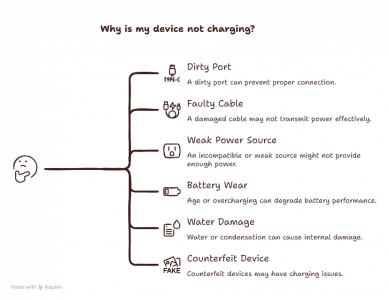
1. A Dirty or Blocked Charging Port
This is by far the number one reason for RELX not charging. The port sits right next to the mouthpiece and pod area, so dust, lint, and dried e-liquid residue build up over time, and even a tiny amount of debris stops the connector from making proper contact.
The fix:
- Turn the device off and remove the Relx Pod Pro or Relx Pod Pro 2 if possible.
- Use a dry cotton swab or a clean toothpick to gently clear the port. Never use anything wet or metal.
- Blow gently into the port to remove loose dust.
- Plug the charger back in and check for the charging light.
This single fix solves the problem for a large share of users, so it’s worth trying first.
2. A Faulty or Non Original USB-C Cable
Not every USB-C cable is built the same way. Cheap, generic cables sold in random multipacks often skip proper internal shielding, so they can’t deliver a steady current. RELX devices are sensitive to this and may refuse to charge if the cable isn’t reliable.
The fix:
- Always try the original cable that came with your RELX first.
- If that’s lost or damaged, use a good quality USB-C cable from a trusted brand, not a no-name multipack cable.
- Test the same cable on another device to confirm it actually works.
3. An Incompatible or Weak Power Source
Where you plug in matters more than people think, a laptop USB port, a cheap car charger, or an old wall adapter may not supply stable enough power, which can cause the device to refuse to charge or repeatedly reset, shown by the light blinking white and red.
The fix:
- Plug into a standard wall socket using a basic 5V USB adapter, not a fast charging brick meant for phones.
- Avoid laptop USB ports if possible, since they often supply less consistent power.
- Try a different wall socket entirely in case the outlet itself is the issue.
4. Battery Wear From Age or Overcharging
Like any lithium battery, the one inside your RELX Device has a limited number of charge cycles. If you’ve had your device for several months and tend to leave it plugged in overnight, the battery may simply be wearing down. This shows up as slower charging or a device that won’t hold a full charge.
The fix:
- Unplug the device as soon as it’s fully charged instead of leaving it connected for hours.
- Avoid letting the battery drop to completely empty before recharging.
- If battery life has clearly dropped compared to when you first bought it, this is normal wear and the device may need replacing.
5. Water or Condensation Damage
If your RELX got splashed, dropped in water, or left somewhere humid for a long time, moisture can get inside the charging port and stop the connection from working. Don’t plug it in while it’s still wet. Leave it in a dry, room temperature spot for at least 24 hours, then try again. If it still won’t charge, internal damage may have occurred.
6. A Counterfeit or Grey Market Device
This one rarely gets mentioned, but it matters in the UAE market. Fake or grey market RELX devices sometimes use lower quality charging chips from the start, so problems can show up within days, not months. We’ll cover how to check authenticity below.
UAE Heat and Power: What Most Guides Don’t Tell You
Dubai’s climate plays a bigger role in charging than most people realize. Lithium batteries slow down their charging acceptance rate in high heat, which is why a device may charge slowly, or not at all, if it’s too warm. If you’ve left your RELX in a hot car or in a bag sitting outside, let it cool to room temperature before charging.
UAE mains power runs at 220 to 240 volts, and most basic USB wall adapters handle this safely. The real risk comes from ultra cheap, unbranded chargers found in budget multipacks, which can deliver inconsistent voltage, the exact kind of unstable power source that triggers the resetting blink pattern mentioned earlier. A properly rated adapter, even a basic phone charger from a known brand, avoids this entirely.
Best RELX Pod Pro 2 for Beginners Who Just Quit Smoking: Complete UAE Guide
Step by Step: The Full Troubleshooting Process
- Wipe the charging port dry and clear with a cotton swab or dry toothpick.
- Switch to the original RELX cable, or a known good quality USB-C cable if the original is unavailable.
- Plug into a standard wall socket, avoiding laptops and car chargers.
- Let it sit untouched for 30 minutes and check for the charging light.
- If still no response, try a different cable and socket combination.
- If the device was exposed to water, dry it fully for 24 hours before trying again.
- If nothing works after an hour of attempts, the battery is likely degraded, and it’s time to contact an authorized retailer.
Charging Notes by RELX Model
Different RELX models charge slightly differently, so here’s a quick comparison.
| RELX Model | Charging Port | Typical Full Charge Time | Charging Light Behavior |
| RELX Infinity | USB-C | Around 45 to 60 minutes | Steady light while charging, turns off when fully charged |
| RELX Infinity 2 | USB-C | Around 35 to 45 minutes | Light pulses gently while charging, turns off when fully charged |
| RELX Essential | USB-C | Around 50 to 65 minutes | Simple on/off indicator with no pulsing |
| RELX Artisan | USB-C | Around 45 to 55 minutes | Steady light while charging, turns off when fully charged |
Note: If your RELX device takes significantly longer than these charging times despite using a good-quality USB-C cable and a reliable power source, the battery may be reaching the end of its lifespan and could need replacement.
How to Tell If Your RELX Device Is Genuine
Counterfeit devices can be behind unexplained charging problems, so it’s worth checking authenticity, especially if you didn’t buy from an authorized retailer.
- Check the serial number on the packaging against the official RELX verification system.
- Genuine devices have clean, evenly spaced printing on the box, with no smudging or spelling errors.
- The charging port fits snugly with the original cable, without wobbling.
- An unusually low price compared to other UAE retailers is a red flag.
When to Stop Troubleshooting and Replace the Device
Most charging issues get solved with the steps above, but sometimes a device has reached the end of its life. Consider a replacement when:
- You’ve tried at least two different cables and two different power sources with no response.
- The device shows no light even after a full hour of charging attempts.
- The battery used to last a full day and now barely lasts a few hours, even right after a full charge.
- There’s visible damage to the charging port, such as bent pins or cracked plastic.
- You suspect the device may be counterfeit based on the checks above.
In any of these cases, reaching out to an authorized RELX retailer for a warranty check or replacement is safer and faster than continuing to troubleshoot a device that may be permanently damaged.
Prevention Tips to Avoid This Happening Again
- Clean the charging port every few days with a dry cotton swab.
- Unplug once fully charged instead of leaving it overnight.
- Keep it out of direct sunlight and hot car interiors.
- Stick to the original cable or a trusted replacement, never an unbranded multipack cable.
- Store the device in a case when traveling to avoid dust and drops.
- Buy only from an authorized RELX retailer in the UAE to avoid counterfeit issues from the start.
Final Thought
Most charging issues with a RELX device come down to something simple: a dusty port, a weak cable, or the wrong power source. Work through the steps above in order, and your device should be charging normally again within minutes. If it still won’t charge after trying everything here, reach out to an authorized RELX retailer in the UAE for support.
Frequently Asked Questions
Q: Why is my RELX device not charging?
A: Usually a dirty charging port, a faulty or non original cable, or an unstable power source. Battery wear and water damage are also possible on older devices.
Q: How do I know if my RELX charging port is dirty or broken?
A: If cleaning it with a dry cotton swab restores charging, it was dirty. If cleaning makes no difference and a different cable doesn’t help either, the port may be damaged.
Q: Can I use any USB-C cable to charge my RELX?
A: You can, but cheap or unbranded cables often fail to deliver stable power. Stick to the original cable or a good quality one from a known brand.
Q: How long should I charge my RELX device?
A: Most models reach a full charge in 35 to 65 minutes depending on the model. Ten to fifteen minutes is usually enough for a quick top up.
Q: Where Can I Buy Authentic RELX Pods in UAE?
A: You can buy authentic RELX Pods from RELX Dubai, a trusted online store offering genuine products, competitive prices, and fast delivery across Dubai and the UAE.
Q: Why does my RELX light not turn on when plugged in?
A: This usually points to a dirty port, a bad cable, or an incompatible power source. A device that’s been completely drained may also need a few extra minutes.
Q: Is it normal for a RELX battery to stop holding a charge?
A: Yes, this is normal wear after several months of regular use. If charging time keeps increasing and battery life keeps dropping, the battery is simply aging.
Q: How do I reset my RELX device?
A: Remove the pod, leave the device untouched for 5 to 10 minutes, then reinsert the pod and try again. This clears most temporary glitches.
Q: Can heat in the UAE affect my RELX charging?
A: Yes. High heat slows down how quickly a lithium battery accepts charge, and devices left in hot cars or direct sunlight may charge slowly until they cool down.
Q: When should I replace my RELX instead of trying to fix it?
A: If you’ve tried different cables and power sources with no result, if there’s visible port damage, or if you suspect the device is counterfeit, contact an authorized retailer for a replacement.